Your everyday headphones
No dedicated translation hardware to buy.

AI-native voice translation
Speak your language. Hear theirs in yours. Parley brings two-way translated voice and bilingual captions to the meeting apps you already use.
Windows 11+ & macOS 14.5+ · No subscription
很高兴,能和你聊聊。
It’s good to talk with you.
Illustrative conversation
For the meeting apps
you already use.
Via audio-device setup.
Not a partnership endorsement.
TWO WAYS. ONE CONVERSATION.
Understand what they mean.
Say what you want to say.
Parley turns your speech into their language and sends it to your meeting app. Your conversation partner stays exactly where they are.
Visual example only. No live audio or measured latency.
 parleyConversation preview
我们周五见,一起讨论下一步。
Original speech
Let’s meet on Friday to discuss the next steps.
THE PARLEY DESKTOP APP
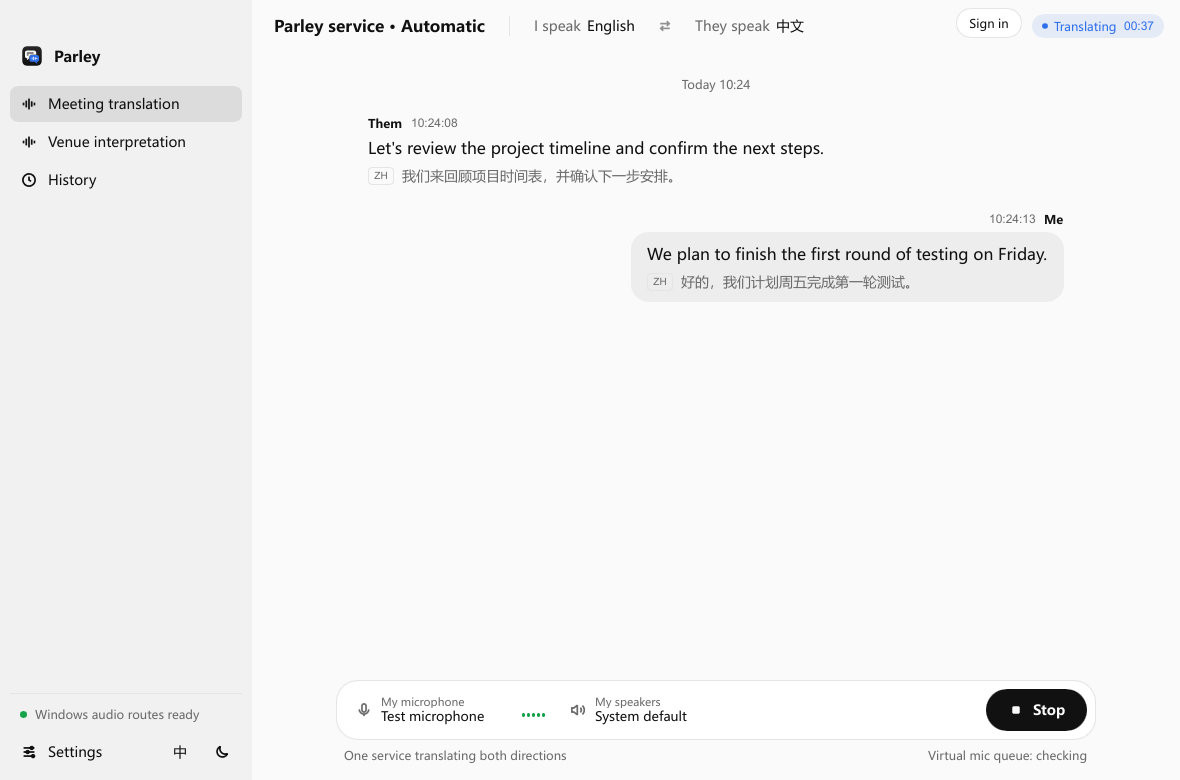
Actual app interface · Sample conversationClick the image to view full size ↗
No dedicated translation hardware to buy.
Local caption history, with SRT export.
Live voice cloning with Qwen and Doubao.

FAMILIAR TOOLS. NEW POSSIBILITIES.
The client call. The overseas team. The next big idea. Keep the software and headphones you know, and let Parley help with the language.
Find your setupWHERE CONVERSATIONS HAPPEN
Speak and listen in your own language during client calls and team meetings. Only you install Parley; your guests stay in their meeting app.
Online meeting translationTranslate a speaker into one or several languages, each on its own output device. A venue licence unlocks this mode; usage is billed separately.
In-person interpretationLANGUAGES & VOICES
Two models, one Parley balance. Choose your languages and voice in the app.
Check language coverage60 input languages · 29 spoken output languages. Availability depends on the model, mode and installed app.
A focused option for Chinese–English meetings and interviews.
Both managed models include live voice cloning. Actual quality and delay depend on the model, network and audio setup.
BEFORE YOUR FIRST CALL
Select a model and a language pair supported by your installed app.
Connect your microphone, meeting audio and headphones using the setup guide.
Run a short check before your call. Stop the session during breaks.
PAY AS YOU GO
No recurring subscription. Both directions share one connected-session charge. See what your next meeting could cost.
Explore pricingOne session charge for both directions. Connected time includes silence. Stop the session to stop billing.
Reference rates · 22 Oct 2026 · USD · Before offers. Current pricing ↗
No. Only the person using Parley installs it. Other participants hear translated voice through their regular meeting audio and need no Parley account.
Use your existing headphones and microphone. For online meetings, configure the virtual audio devices using the guide. Test your actual meeting app and devices before an important call.
Billing starts when the service connection is ready and includes silence. It is measured by the millisecond. Both directions or multiple outputs share one session charge. Stop the session to stop billing.
Selected captured audio is sent to the cloud service for translation. Caption history is stored locally and can be exported as SRT. Read the data handling page for details.
Your computer. Your headphones. A conversation that goes further.
Download Parley